Settings decide whether the product runs right or wrong, yet they are understood by the fewest people. Rifena gathers settings and access into one ordered area and states what each part affects and which access changes it.
System → Settings only shows the groups the current account may manage. Two
people can see a different number of items in the same organisation without a
product error.
Area System → Settings
Who performs this task Administrators, HR and payroll staff by responsibility
Display Each card is permission-filtered
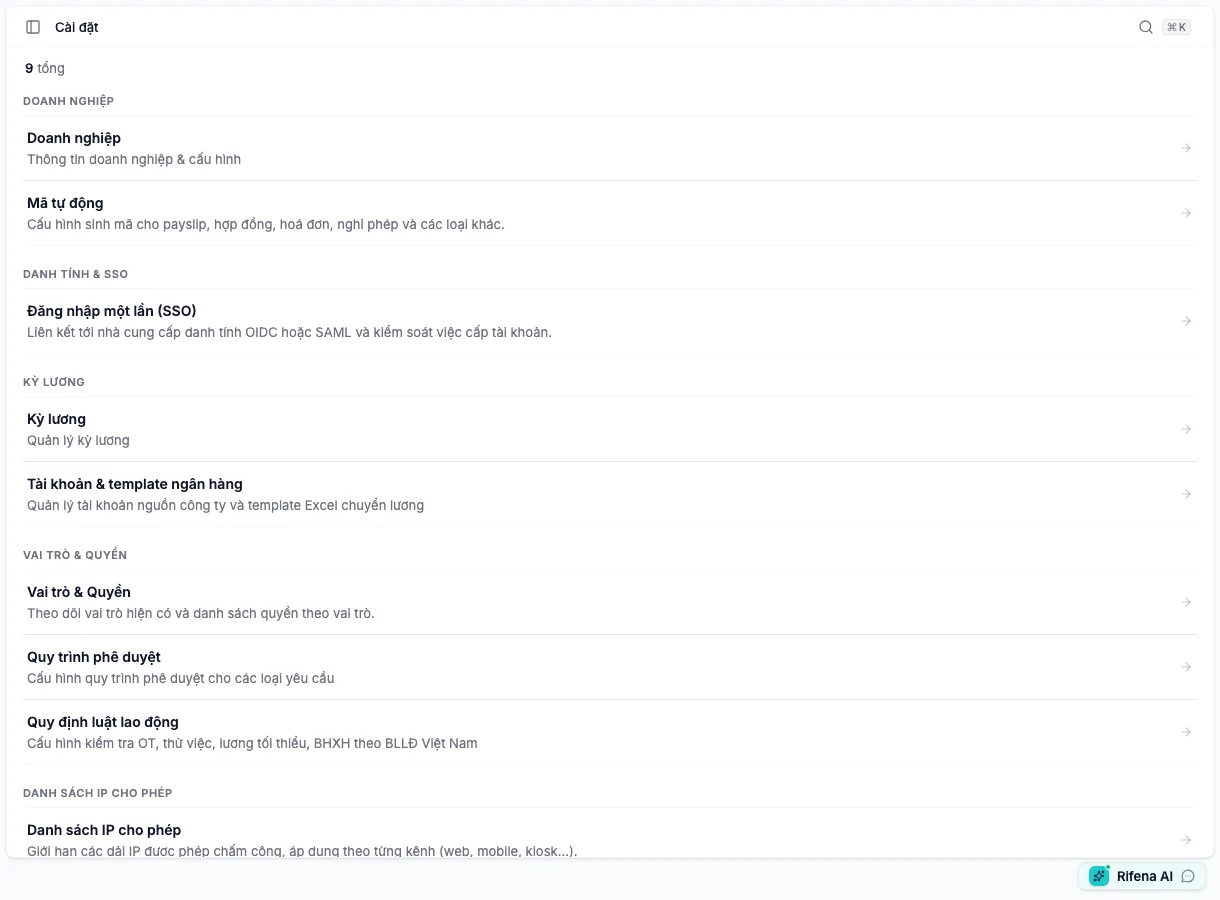
The current Settings page groups configuration by purpose. Account details are anonymised.
Current Settings screen tree
Open settings
Organisation
Organisation details and business-code generation.
Organisation Logo, name, contact, address, timezone and minimum-wage region. Requires: organisation update permission.Automatic codes Pattern, preview, state and controlled counter reset. Requires: sequence view permission.
Identity & SSO
Two opposite trust directions appear one after another to prevent configuration mistakes.
Single sign-on (SSO) Employees sign in through an external provider, or Rifena acts as identity provider for registered apps. Requires: permission to view identity security.
Payroll periods
Attendance cycles and salary-transfer file configuration.
Payroll periods Create periods, close/reopen attendance, rename and manage state. Requires: period view; actions have separate permissions.Accounts & bank templates Source accounts, original Excel file, column mapping, preview and export order. Requires: at least one account/template management permission.Open statutory report templates Filing workbooks, data mappings, and preserved version history. Requires: Rifena has enabled the feature for the organisation and the account can generate statutory reports.
Roles & Permissions
Access, approval routing and labour-rule guardrails.
Roles & Permissions Overview, roles, assignments and audit. Requires: at least one role, permission, assignment, or assignment-audit permission.Approval workflows Definition library, steps, conditions, fallback and activation. Requires: workflow management permission.Labour rules Choose warn/block for organisation rules; legal values and sources are read-only. Requires: labour-rule view; changes require management access.
IP
Allowed networks for each clocking source.
IP allowlist IPv4/IPv6 ranges, labels, Web/Mobile/Kiosk/Device/Manual sources and state. Requires: IP allowlist view permission.
Items no longer under Settings
Legacy URLs can remain for compatibility, but current user paths are:
Operations → Timekeeping → Configuration → Clock policies ;Operations → Timekeeping → Configuration → Geofences ;Operations → Timekeeping → Configuration → Policy assignments .
Shifts, work patterns, holidays and leave live under Operations → Time
policies .
When a card is missing
Verify the selected organisation.
Use Roles and data scope to distinguish an
administration permission from self-service.
Do not type a page address to bypass navigation; detail pages still enforce
permission and can return 403 .
If a screen is visible but edit is not, the action may require another
permission or the record may be read-only in its state.
See Set up Rifena or
Access and notification issues .