

Reference
Payroll periods and attendance lifecycle
Pay periods and attendance periods must line up, or every number downstream drifts. Rifena ties the two lifecycles together with explicit statuses, so closing attendance is a precondition of payroll rather than a verbal agreement.
Close a period only after its end date and after pending timesheets, leave, overtime and holiday-work items are resolved.
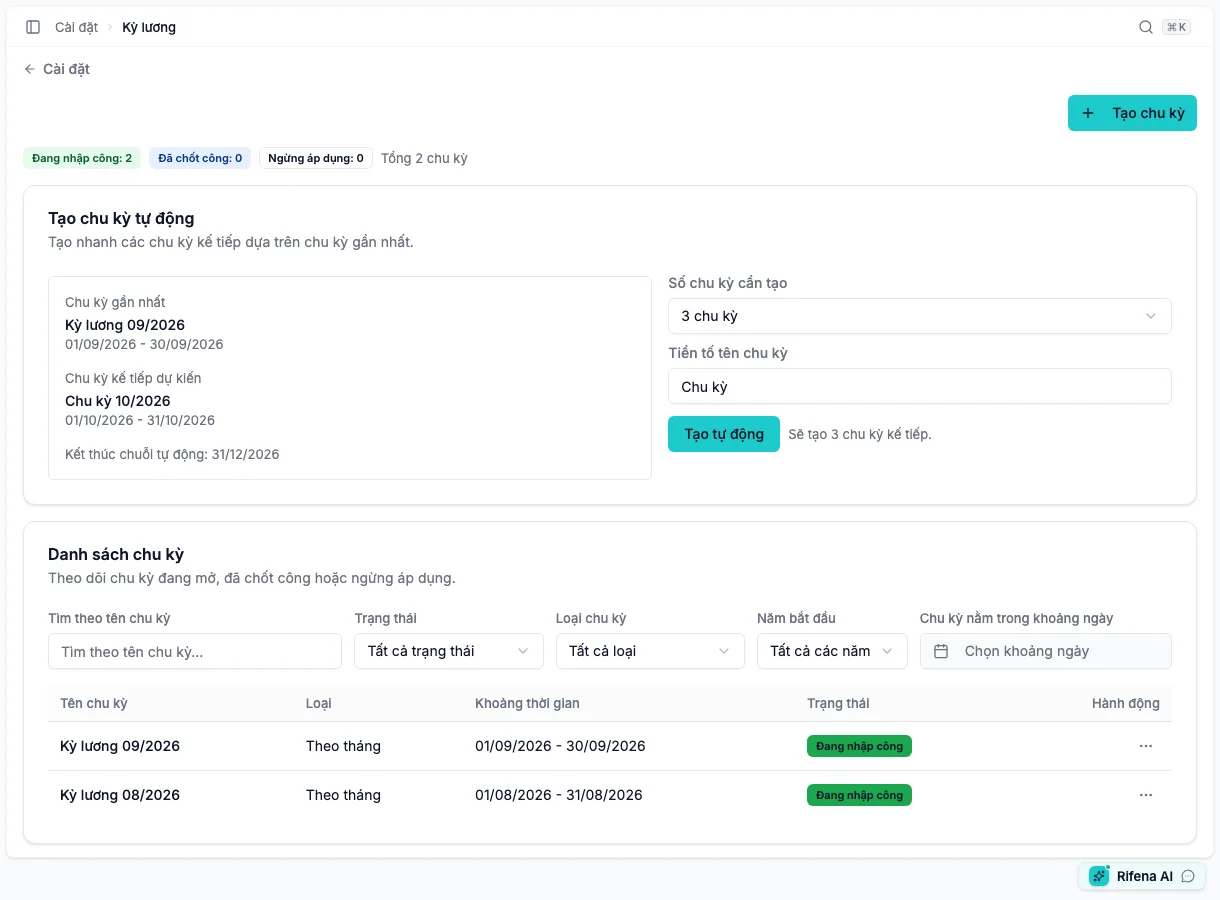
Create periods
Create manually or generate 1, 2, 3, 6 or 12 periods after the latest period as offered. Types include weekly, biweekly, monthly and custom. Date ranges must not overlap. Verify name, start/end and type before confirmation.
A new period starts as Attendance open. Filter by year, date, type, state or name.
States and actions
- Attendance open
- Time data can be processed by authorised users; the primary action is Close attendance.
- Attendance closed
- Time data is locked; Reopen attendance appears only when completed payroll does not block it.
- Disabled
- The period is not used for new operations, while history remains.
- Edit
- Name may remain editable while definition is locked; type/dates require an eligible open state.
- Delete
- A closed period must be reopened first and references can still prevent deletion.
Close attendance
- Wait until the end date has passed.
- Review Timesheet, Overtime, Holiday work and related leave under Operations.
- Open the period readiness check.
- Resolve every listed blocker.
- Choose Close attendance and read impact.
- Verify Attendance closed.
Typical blockers are open/incomplete timesheets, pending leave, pending overtime and pending holiday work. Pending compliance violations do not automatically block closure; they remain in Compliance and do not cause wage deductions.
Reopen attendance
Only reopen after identifying the source error, affected people and payroll recovery plan.
- Open the Attendance closed period.
- Choose Reopen attendance.
- Review affected payroll runs.
- If only editable results exist, reopen and correct the source.
- Close again and recreate/recalculate affected payroll.
Rifena must block reopen when an approved or paid payroll result cannot safely be invalidated. Stop and use an approved adjustment process; do not rewrite history.
When an action is missing
- No Close attendance: wrong state, end date not passed or missing permission.
- No Reopen attendance: not closed, completed payroll blocks it or missing permission.
- Cannot delete: still closed or referenced.
- Cannot change dates/type: definition is locked.