
Guide
Labour rules: validation and safety
Labour law keeps changing, and every organisation applies it with a different strictness. Rifena separates two layers: legal values are managed by the platform per country and take effect by date; the organisation only chooses which rules warn and which block. Compliance travels with everyday actions instead of waiting for an audit, and nobody can change a legal figure by accident.
After this guide you know which rules the library holds, how to apply them and change their mode, on which screens and when the system checks them, what happens on a violation in warn or block mode, and why the legal data stays safe.
The rule library
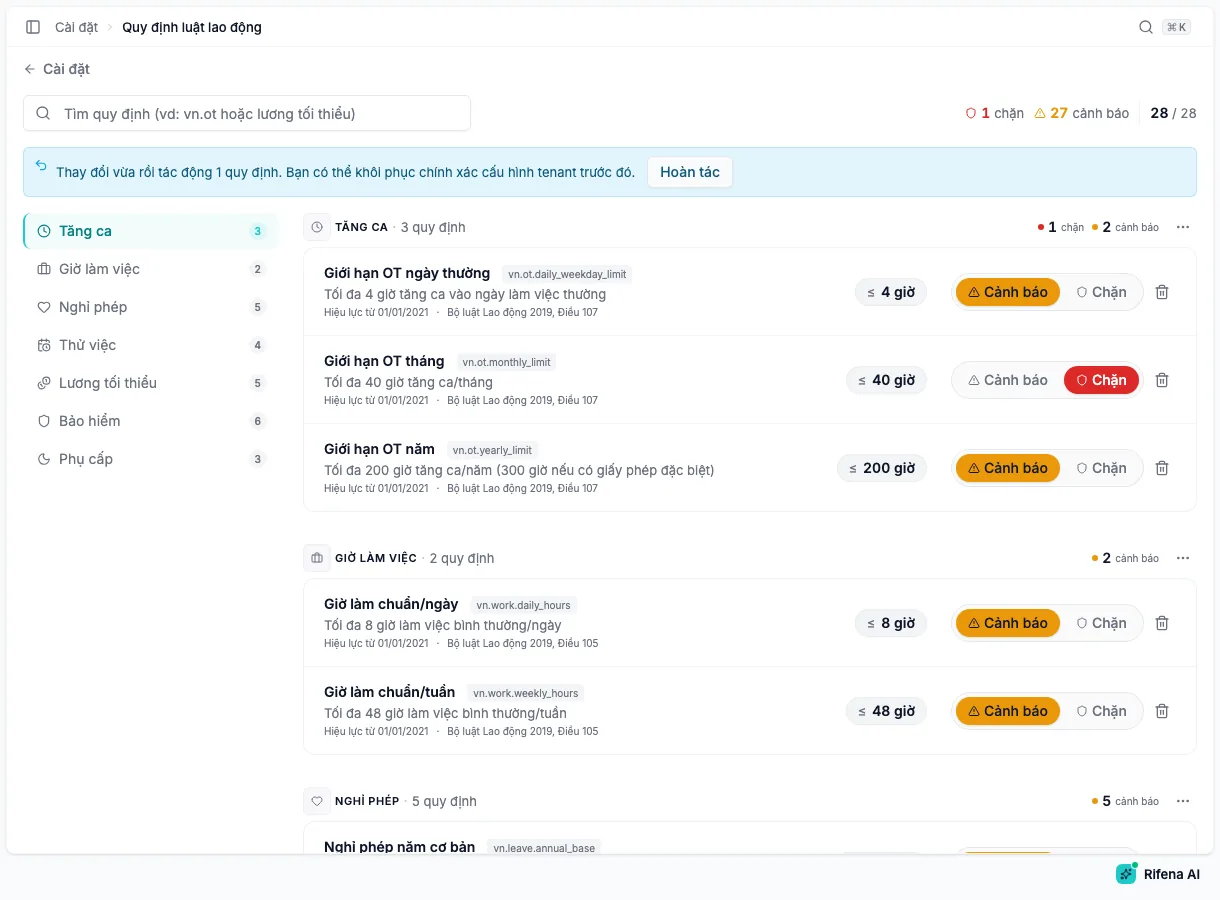
The library currently holds 28 rules from the 2019 Labour Code and related regulations, in seven categories:
| Category | Rules |
|---|---|
| Overtime | Daily, monthly and yearly overtime limits |
| Working hours | Standard hours per day and per week |
| Leave | Base annual leave, seniority leave, maternity, marriage and bereavement leave |
| Probation | Maximum probation for four skill levels |
| Minimum wage | Regional minimum wage I to IV, and the cap on wage deductions for attendance violations |
| Insurance | Social, health and unemployment insurance rates for employee and employer |
| Premiums | Night shift, public holiday and weekly rest day premiums |
For each rule you can read the value and unit, the effective date, an upcoming value when one is scheduled, and the legal source. The header counts how many rules block, how many warn, and how many are applied out of the total. The search box filters by name, code or description.
Applying rules to the organisation
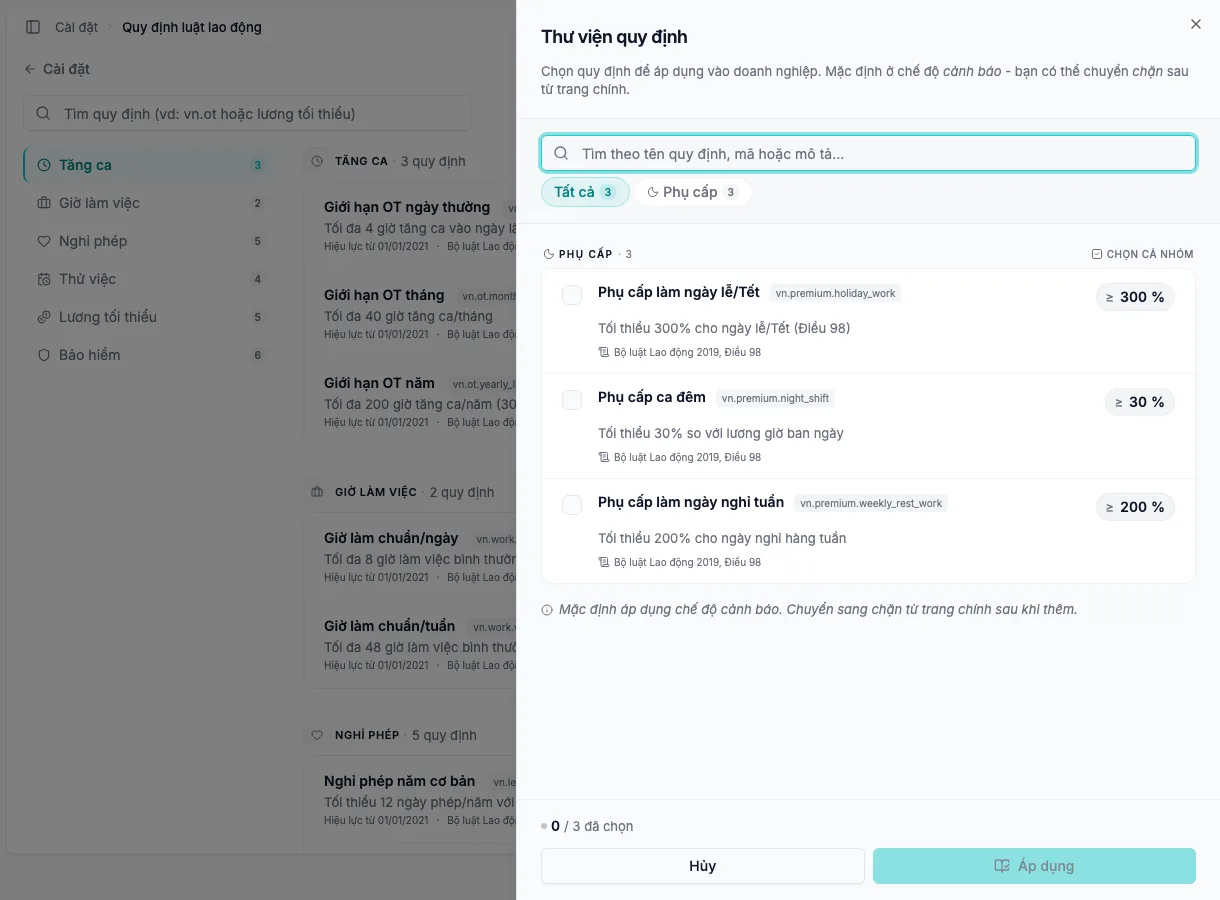
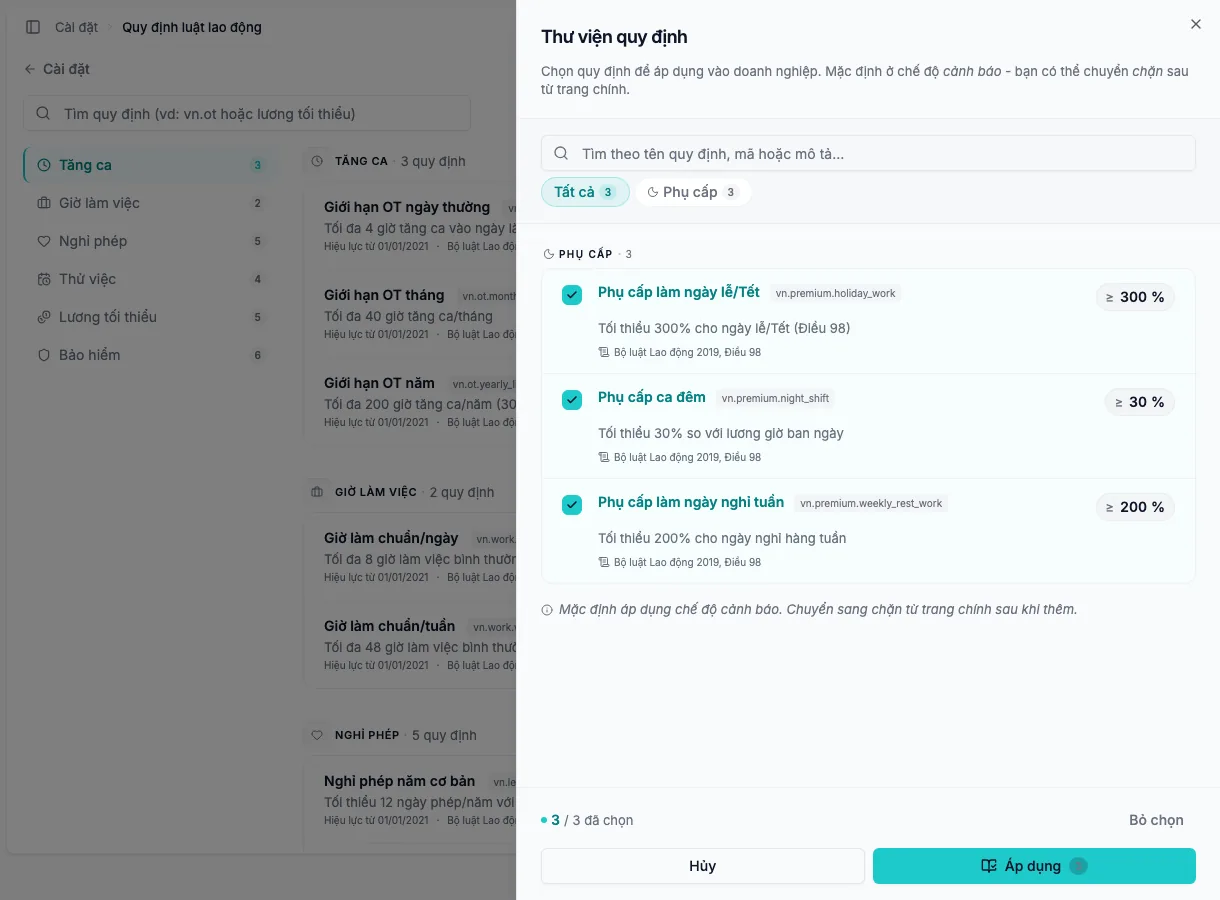
A newly registered organisation starts with the whole library applied in warn mode. If some rules were removed, choose Add rule:
- Filter by category or search by name; select single rules or Select group.
- Read the value and effective date of each rule before adding it.
- Choose Apply. Rifena reports how many rules were added; if only some were, read each failed row and retry those.
New rules always start in Warn mode. No Add rule button means every available rule is already applied, or the account can only view.
Three modes for every rule
- Warn
- Rifena still saves, but shows the warning on the form and returns it after saving so an authorised person can review.
- Block
- The form or business action cannot be saved while it violates the rule; the message names the blocking rule.
- Remove from organisation
- The organisation stops checking that rule; it stays in the library and can be added again at any time.
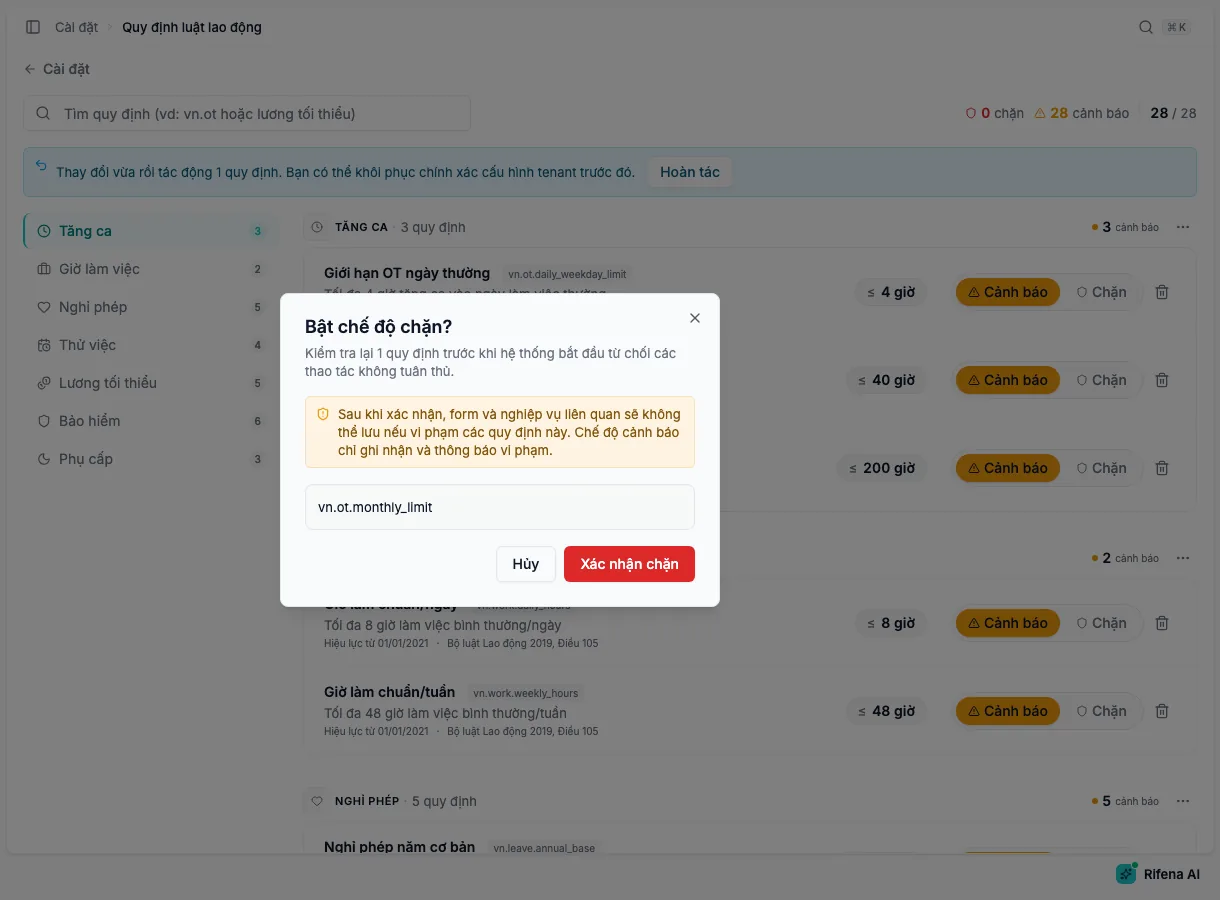
- Warn → Block: the Enable block mode? dialog lists the affected rules; choose Confirm block.
- Block → Warn: applies immediately with a notification.
- The bin icon removes one rule after confirmation.
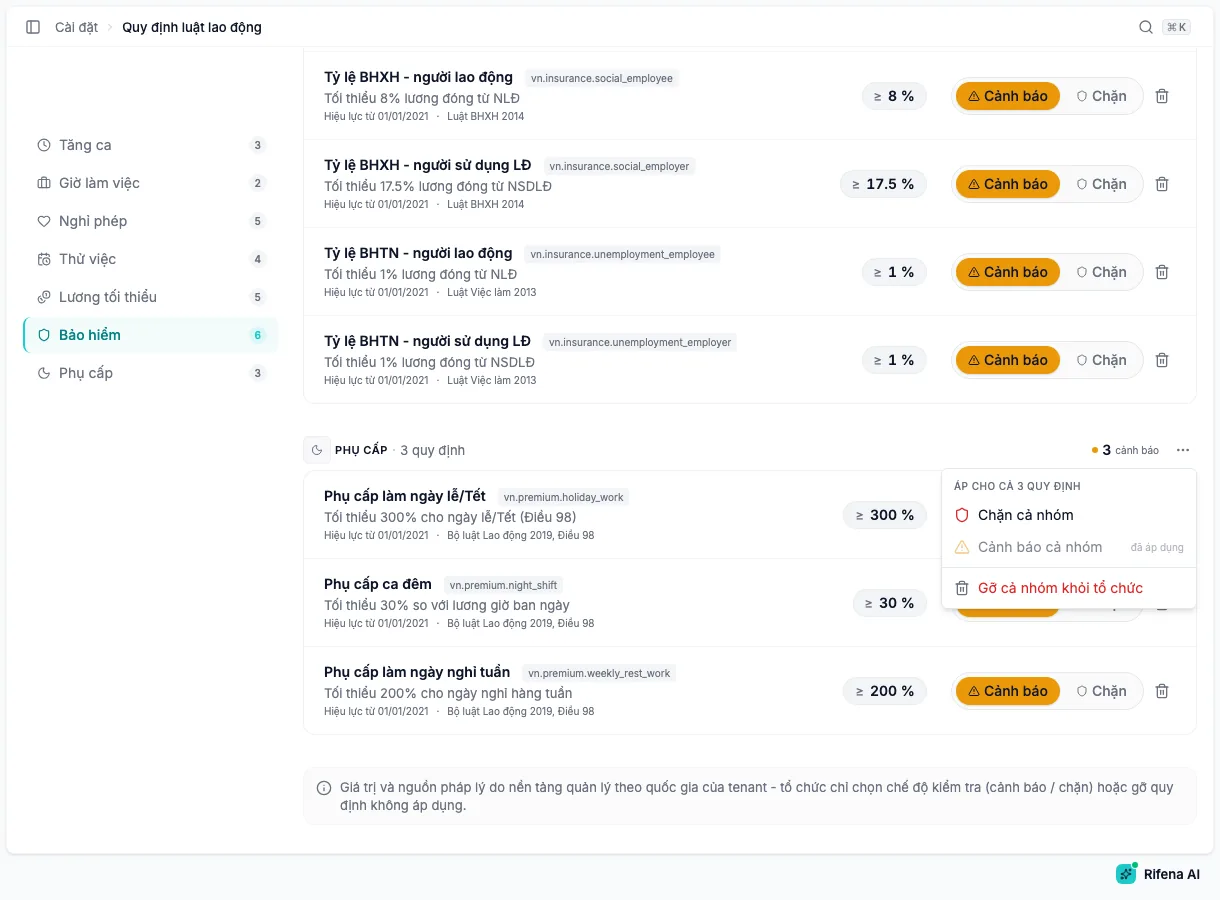
The ⋯ menu next to a category name offers Block all, Warn all and Remove category from organisation. After each change, a banner shows how many rules were affected, and Undo restores the exact previous configuration while the banner is visible.
Where the system checks
Rules are checked at two moments: as you type on a form, and when you save.
Live checks on forms
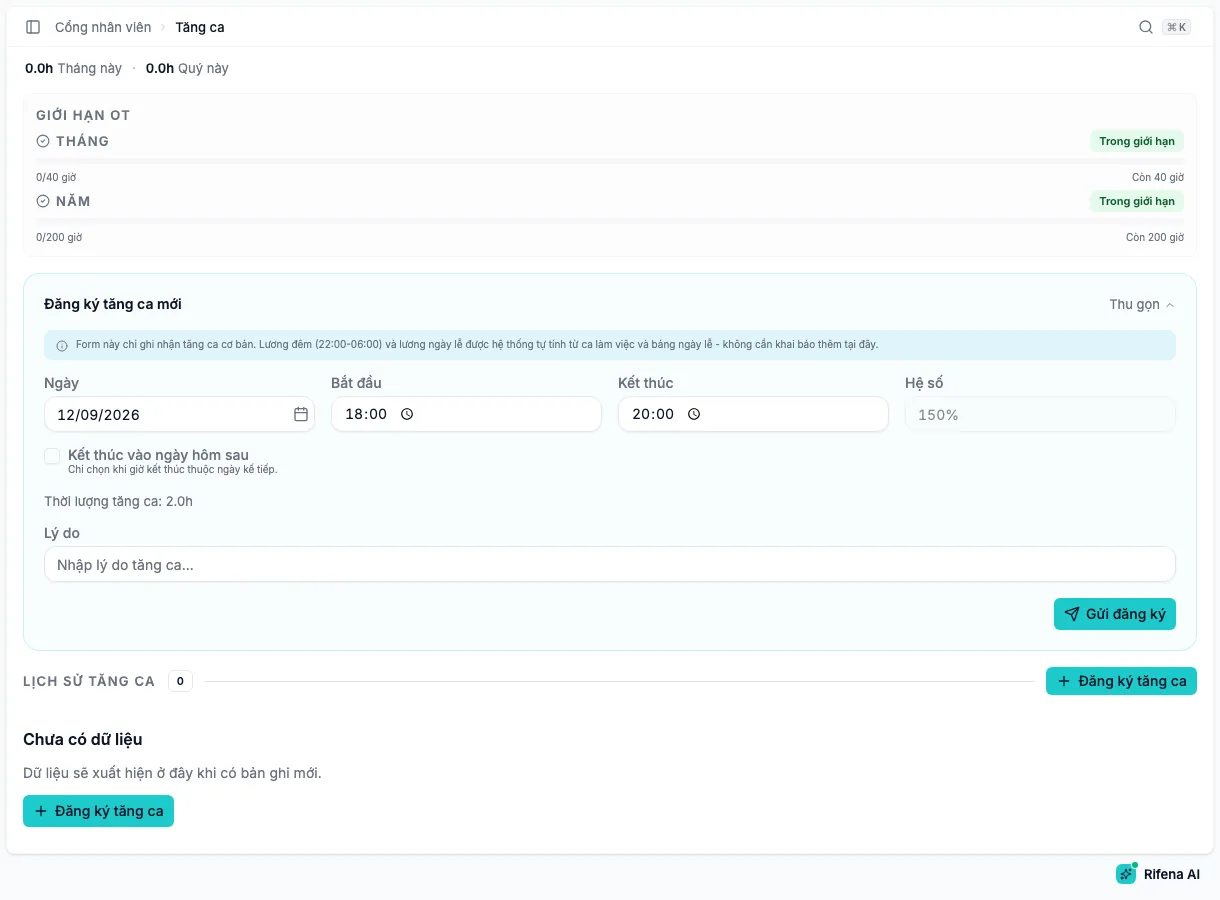
Under the related field, the form shows Within the allowed limit, or the value exceeds the limit, is below the minimum or differs from the required value, with the suffix (warning on save) or save will be rejected. If the rule cannot be evaluated yet, the form says so and the system checks again on save.
| Screen | Rules checked |
|---|---|
| Employment contract when hiring and when editing | Standard weekly hours; probation length for probation contracts; regional minimum wage for the organisation’s region |
| Overtime requests, edits and approvals | Daily, monthly and yearly overtime limits, added to existing records |
| Leave types | Default days for annual, maternity, marriage and bereavement leave |
| Insurance plans | Employee and employer contribution rates |
| Holiday work | Public holiday premium |
| Base salary events | Regional minimum wage |
| Payroll templates and payroll runs | Insurance contribution caps and the cap on attendance-violation deductions |
Checks on save
On save, Rifena evaluates each rule again with the real data:
- In Warn mode the record is saved and the warning appears in the dialog or result page for an authorised person to decide.
- In Block mode the record is not saved; the message says Cannot save with the violated rule, and your input is kept so you can correct it.
- Removed rules, or rules that do not apply to the case, are not evaluated.
Inside the payroll template builder
For mandatory insurance components, the contribution cap is looked up from the rule in force for the payroll period: social and health insurance use 20 times the base salary reference; unemployment insurance uses 20 times the regional minimum wage of the unit. When the region or an effective value is missing, the template still previews and Template checks names the component whose cap is unknown; a rule in Block mode must be resolved before publishing or running payroll.
For organisations in Vietnam, attendance violations are points and reference amounts. The Wage deduction for attendance violations rule caps the amount that can be deducted; a template that deducts more is flagged in preview and blocked on publish.
Why the legal data is safe
- Read-only: name, code, value, unit, source and effective date are managed by the platform per country; the organisation cannot edit them or turn a legal value into an internal convention.
- Effective by date: every legal change is released as a new value with its own effective date; past payroll periods use the value of their time, and the screen announces values that are upcoming.
- No guessing on missing data: a rule that cannot be evaluated because the country, wage region or effective value is missing says so instead of silently passing or blocking; only a rule configured as Block blocks.
- Warn by default: an organisation starts by observing and switches rules to block one by one when its process is ready.
- Confirmed and reversible: switching to block or removing always asks for confirmation; bulk actions offer an undo that restores the exact previous configuration.
- The right people: view-only accounts see every rule but cannot change modes or remove rules.
Current limits to know
- Probation by four skill levels: contracts have no skill level field yet, so the contract form checks against the 180-day maximum.
- Standard daily hours cannot be checked from a contract yet; only weekly hours are checked.
- Regional minimum wage uses the organisation’s wage region; multi-site organisations need one region or must wait for per-site support.
- Insurance rates and premiums are checked on their configuration screens only, not yet cross-checked inside payroll formulas.
Rifena states these limits so that you do not overestimate compliance just because a rule exists in the library.
Different from attendance compliance
Labour rules are the legal guard rails applied to forms and payroll. Operations → Compliance manages attendance violation rules, individual violations and statistics; reference amounts there do not become payroll deductions automatically. See Compliance review.
Next
- Labour rules to look up each label on the screen.
- Payroll template builder to understand insurance caps in a payroll template.
- Settings issues when a rule will not change mode.