

Reference
Labour rules
Labour law changes and each company applies it with a different strictness. Rifena keeps the legal values as system data while the company chooses which rules warn and which block, so compliance travels with daily operations instead of waiting for an audit.
The organisation chooses enforcement; legal value, unit, source and effective date are system-managed and must not be edited like an internal preference.
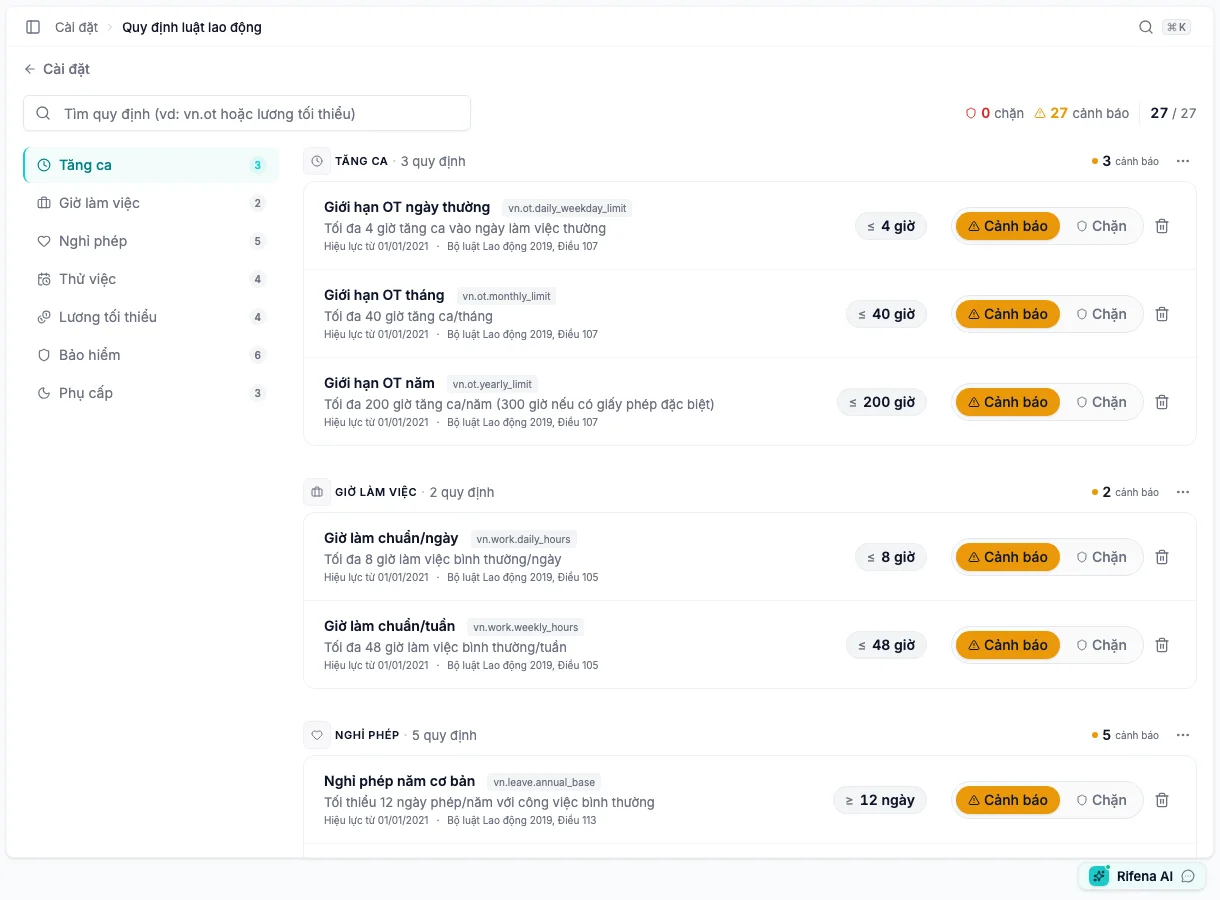
Seven rule categories
- overtime;
- working hours;
- leave;
- probation;
- minimum wage;
- insurance;
- allowances.
Use search or category navigation. If a category has no appropriate rule for the current effective date/jurisdiction, do not copy a value from old documentation.
Two information layers
System-managed
Rule name/code, value, unit, legal source, effective date and supported legal scope are read-only so an organisation cannot redefine a legal value.
Organisation-selected
- Warn
- Shows risk while an authorised person may continue after review.
- Block
- Prevents completion of a violating action; read confirmation before broad use.
- Remove
- Stops this organisation's application without deleting the system-library rule.
Add or change rules
- Choose Add rule when the library still contains unapplied entries.
- Read category, source, effective date and value.
- Select Warn for observation or Block after operations are ready.
- Save and verify the rule in its category.
- Test one compliant and one violating case.
Bulk selection can Warn, Block or Remove multiple rules. A bulk result can be partial; keep successful rows and retry only failures after fixing their cause. Use Undo while available for an accidental change, then reopen the rule.
Different from attendance Compliance
- Labour rules is the legal guardrail library and Warn/Block selection.
- Operations → Compliance manages attendance-violation rules, cases and statistics.
- A compliance reference amount must not become an automatic wage deduction.
When an action is missing
- No Add rule: every available rule is applied or the account is view-only.
- Legal value is not editable: expected system ownership.
- Partial bulk result: keep successful rows and resolve each remaining reason.
See Compliance and Time policies.