

Reference
Organisation and automatic codes
Employee codes, contract numbers and payslip numbers look small but everything else hangs on them. Rifena lets the company define the numbering rules once and issues consistent numbers from then on.
Organisation
Screen: System → Open organisation settings
This screen manages the logo, organisation name, phone, address, timezone, minimum-wage region and read-only system information.
Safe update
- Verify the selected organisation.
- Change only fields backed by confirmed information.
- Use a supported PNG, JPG or WebP for the logo.
- Treat timezone as a cross-product setting that affects dates and times.
- Choose Save and wait for success.
- Reload and confirm the value remains correct.
Country cannot change after organisation creation. Do not choose an approximately correct wage region to complete the form; leave it unselected when the information is not confirmed and the workflow permits.
Automatic codes
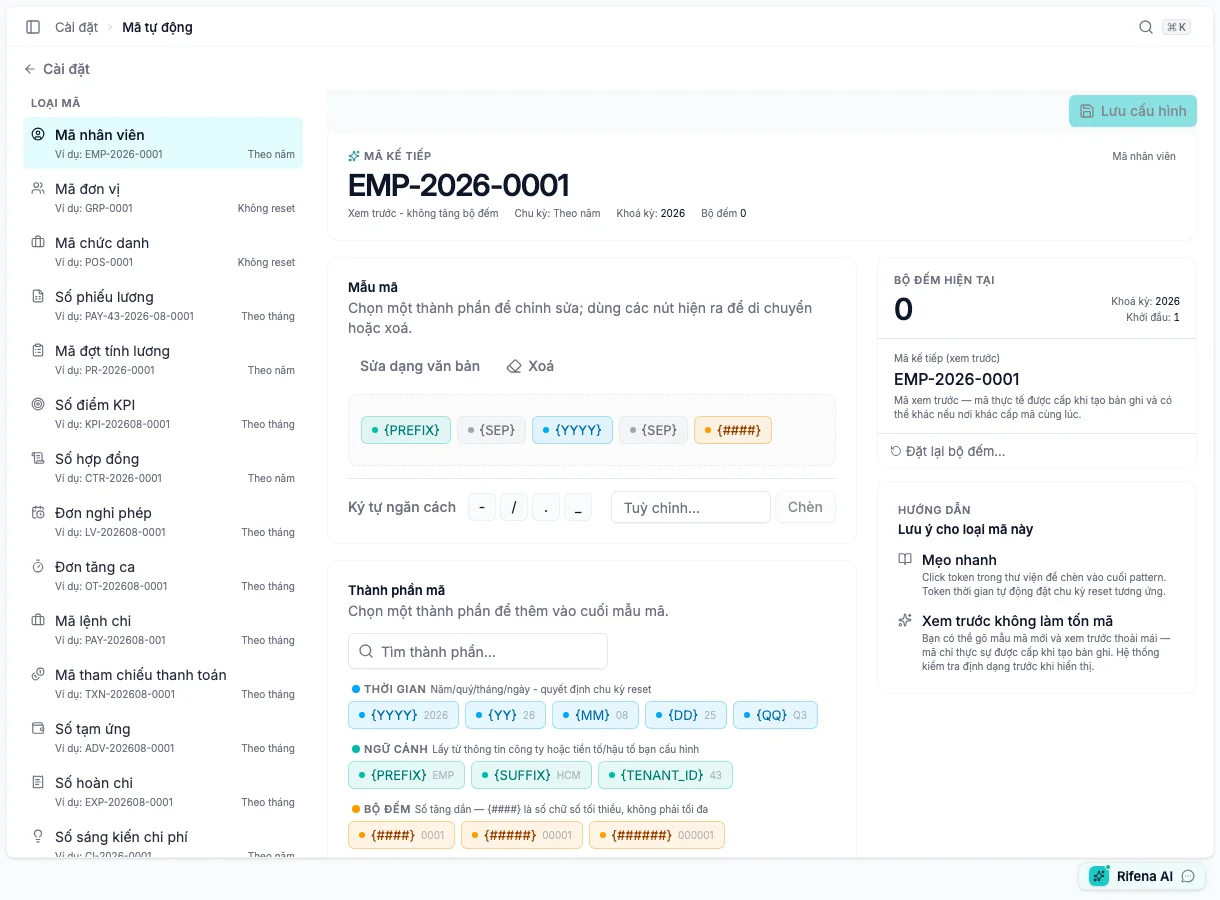
Screen: System → Settings → Automatic codes
Open automatic codes cover entities with a real issuance flow, such as employees, groups, positions, payslips, payroll runs, contracts, leave, overtime, payments, advances, expenses and training. The visible list can change when a new issuing flow is introduced.
Edit a pattern
- Select the exact code type.
- Use the pattern canvas or raw mode when offered.
- Configure prefix, suffix, separator, number padding and date/time tokens.
- Inspect current and next-code Preview.
- Save and reopen the same type.
Rifena can infer reset frequency from year/month/day tokens. Do not add a time token merely for appearance if it changes the intended counter reset.
- Activate
- Allows the configuration to issue new codes.
- Deactivate
- Preserves configuration/history but stops new use.
- Reset counter
- Requires a reason and checks collision with issued codes.
- Preview
- A prediction from current configuration, not an issued code.
A missing type normally means it is not currently exposed or has no live consumer. Do not substitute a similar type.
When editing is unavailable
- Organisation is read-only: the account lacks update permission.
- A code type is absent: it is not exposed for current issuance.
- Reset is blocked: missing reason, locked configuration or collision risk.